 BulkBack
Never miss a Costco price adjustment.
Scan your receipts once and BulkBack watches the savings book and community-spotted price drops for you, with item numbers ready for the return desk.
Android follows about a month after iPhone. Tap a button to get one email on launch day.
- No account or sign-up
- Receipts stay on your phone
- Core features free forever
Not affiliated with Costco. Costco decides every claim, so a potential refund is never guaranteed.
Three steps. About a minute of effort.
Costco may refund the difference if an item you bought goes on sale at the same warehouse within 30 days. BulkBack does the watching.
Add your receipts
Snap a photo, or share the receipt from the Costco app or costco.com. BulkBack reads the items and prices and keeps them on your phone.
We watch for price drops
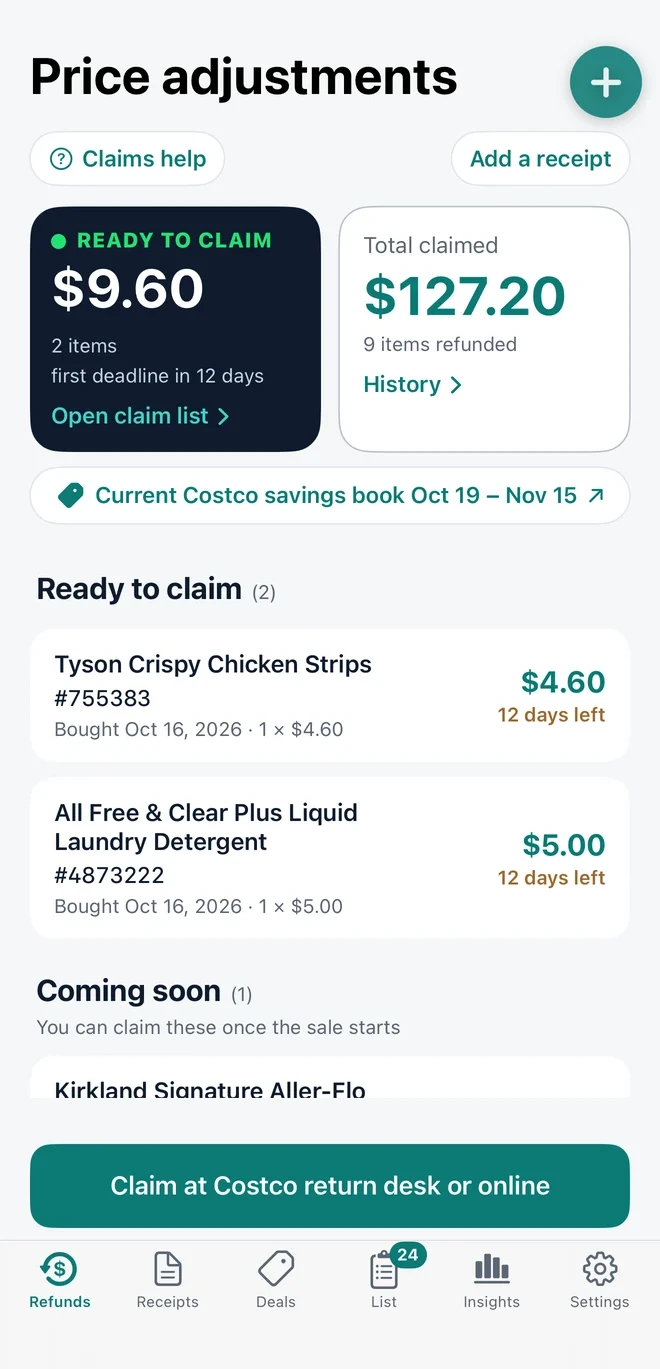
Every savings book sale, and every price drop other members spot in the warehouse, is checked against what you bought. You see the money waiting, the potential refund for each item, and how many days are left.
You claim it
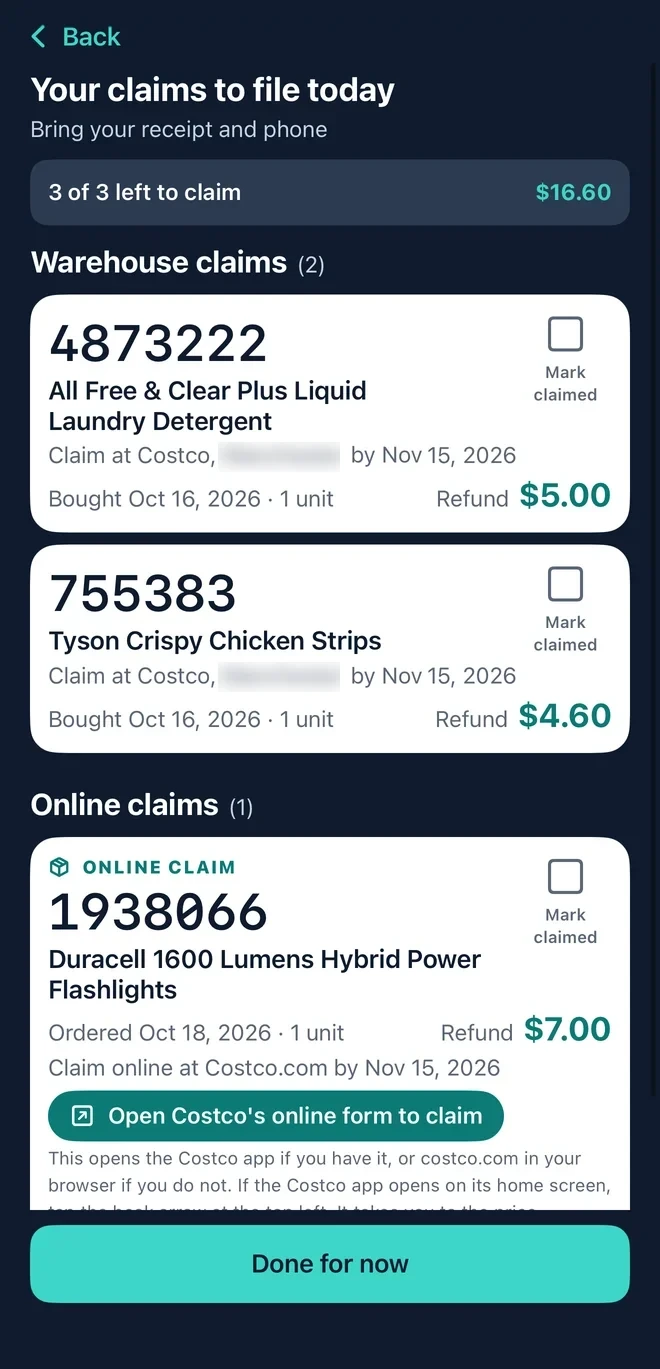
One list shows every claim with big item numbers. Read them out or show the claims list on the phone at the return desk and tick them off, or tap through to Costco's online form for web orders.
Browse every deal, with photos and savings.
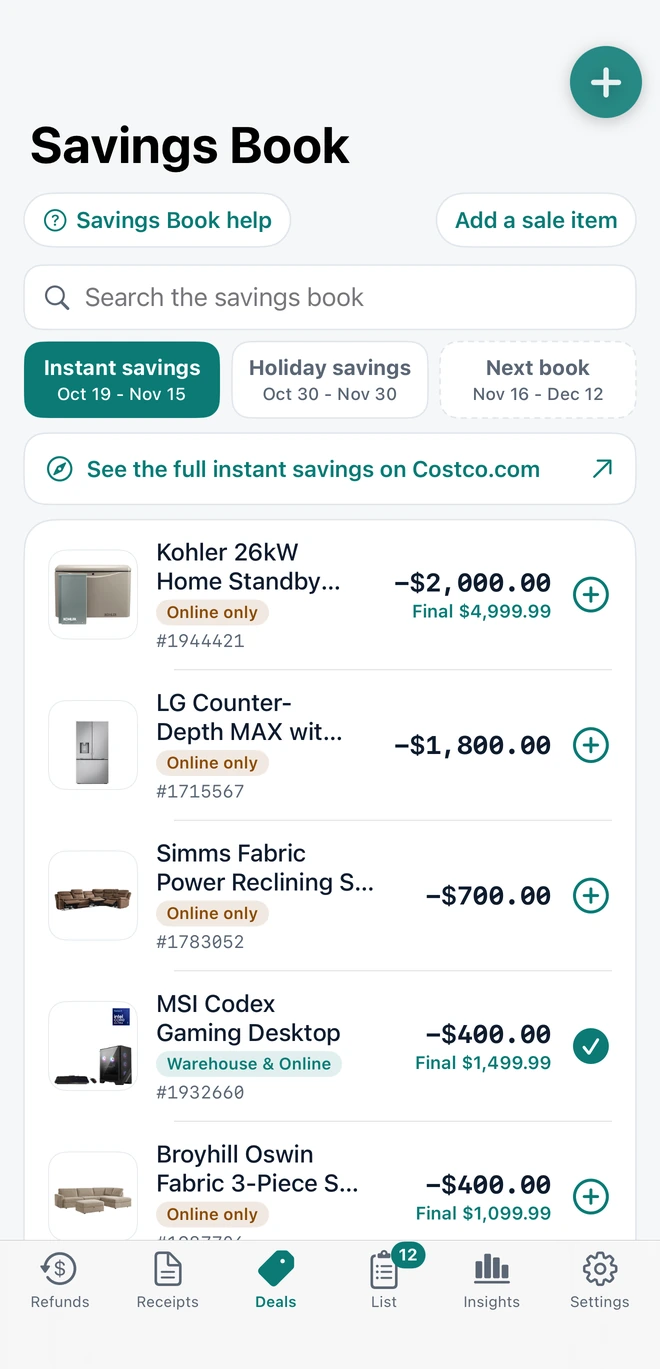
Search the current Costco savings book, flip between books, and tap the plus to add an item to your shopping list. Item numbers are right there for quick matching.
- Instant and holiday savings, with validity dates
- Warehouse and online-only deals labeled
- Add to your shopping list in one tap
A list that walks the store with you.
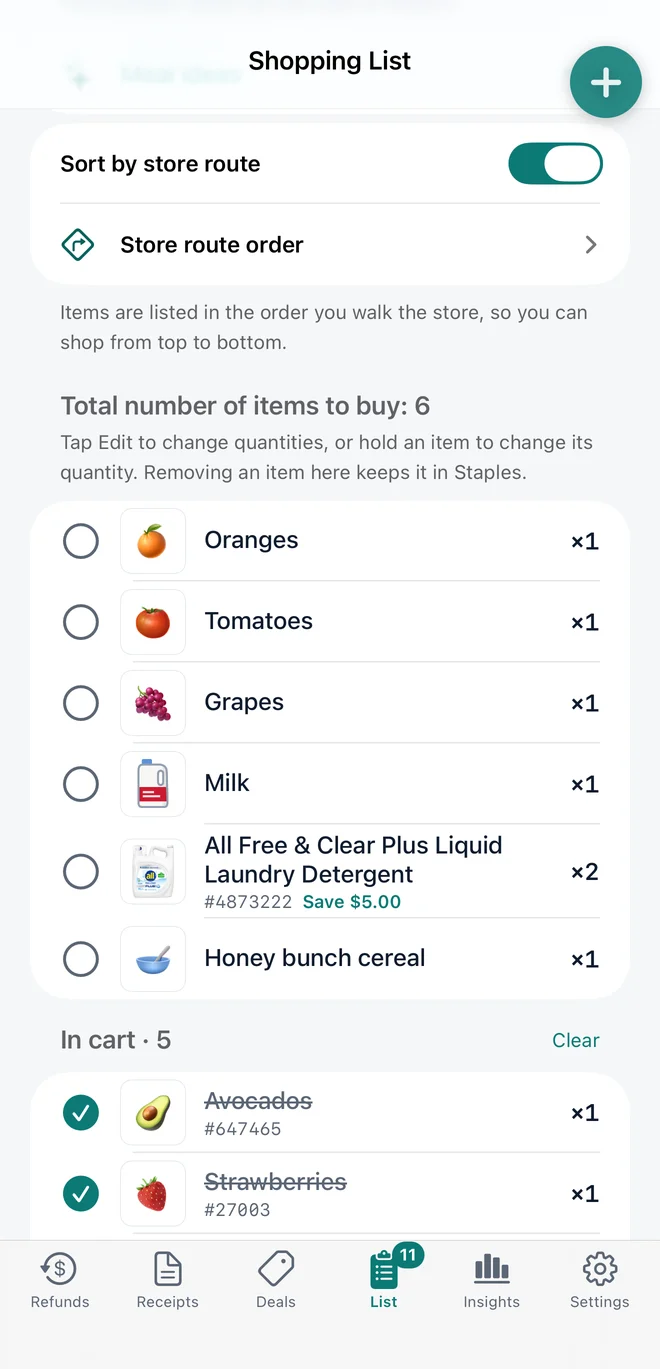
Build your list by typing, from the savings book, or from past receipts. Sort it in the order you walk the warehouse, then check items into your cart as you go.
- Sort by store route, top to bottom
- Sale items show the item number and what you save
- Checked items move to "In cart"
- Optionally keep the list screen on until you finish shopping
- With Plus, get an alert when a list item goes on sale
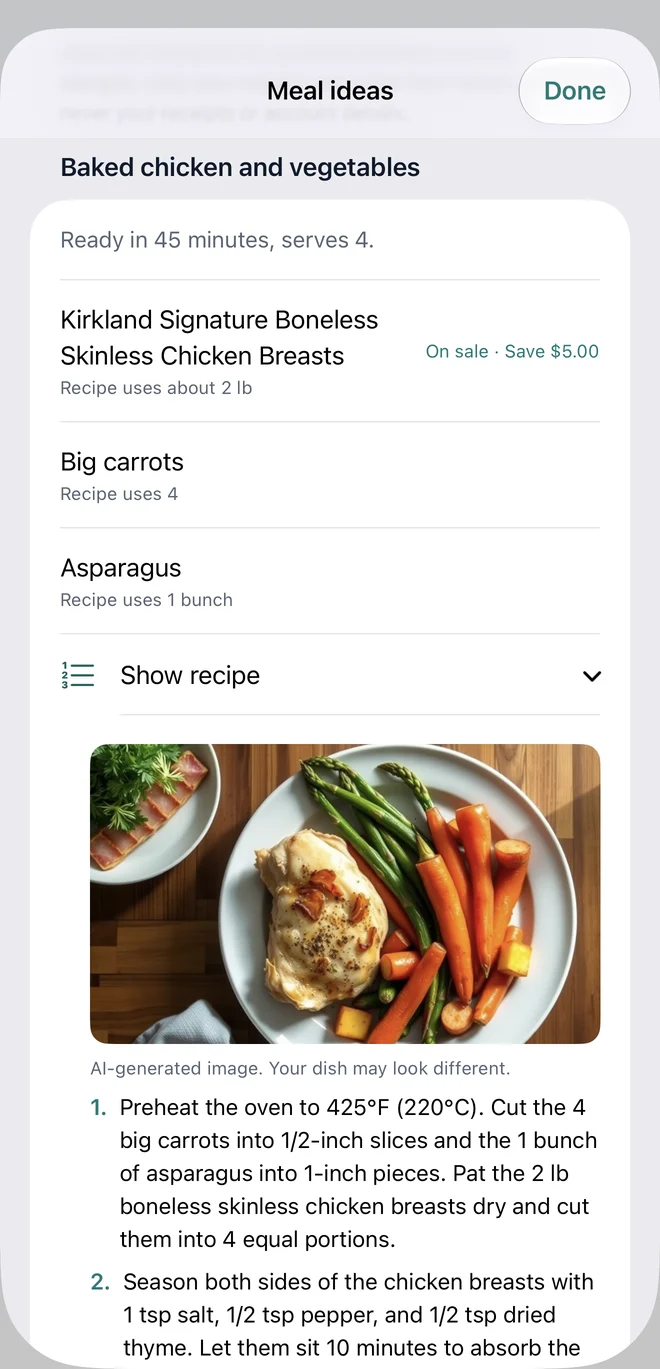
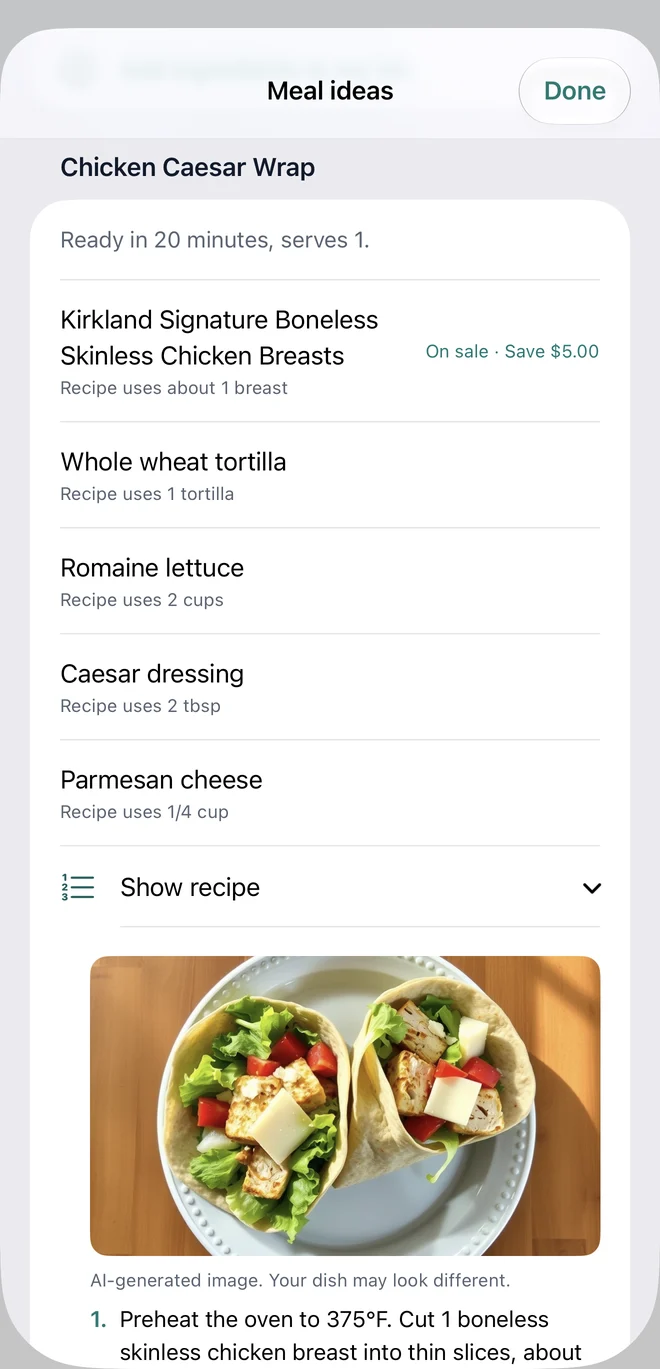
Dinner ideas, with sale savings if you want them.
Tell BulkBack what you're planning, like “dinners for 4”, and get recipe ideas. Use what's already in your Staples, and switch on “Prefer items on sale now” to favor sale items and see what you'd save. Each idea shows the time, servings, the amounts you need and the steps.
- Optional toggle: prefer items on sale now
- On-sale ingredients marked with the savings
- Ingredient amounts and step-by-step recipes
- Dish photos are AI-generated and labeled as such
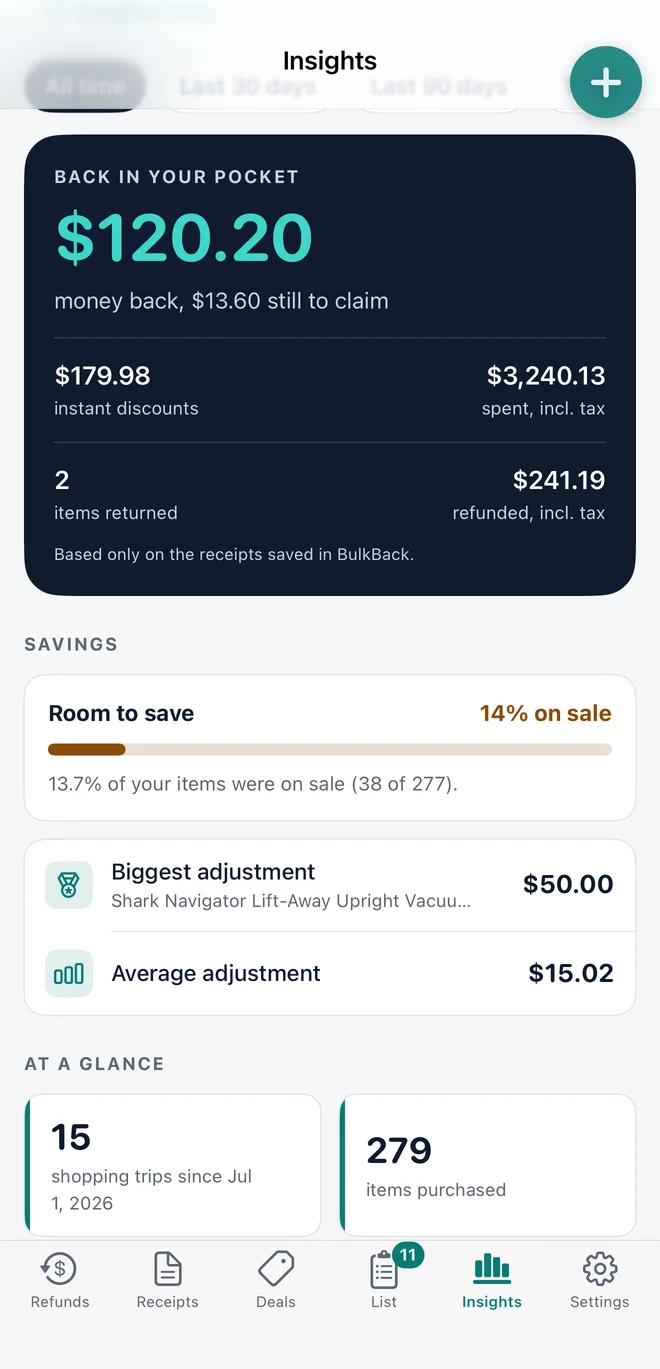
Know your Costco habits, in numbers.
One dashboard turns your saved receipts into answers: what you spend, what you buy most, which items got pricier, and what you've saved. It's based only on the receipts saved in BulkBack.
- Spending by month, receipt and store section
- Most purchased items, biggest spends and items that got pricier
- Trips, items per trip, average receipt and busiest shopping day
- Money back, instant discounts and how much of your past purchases were on sale
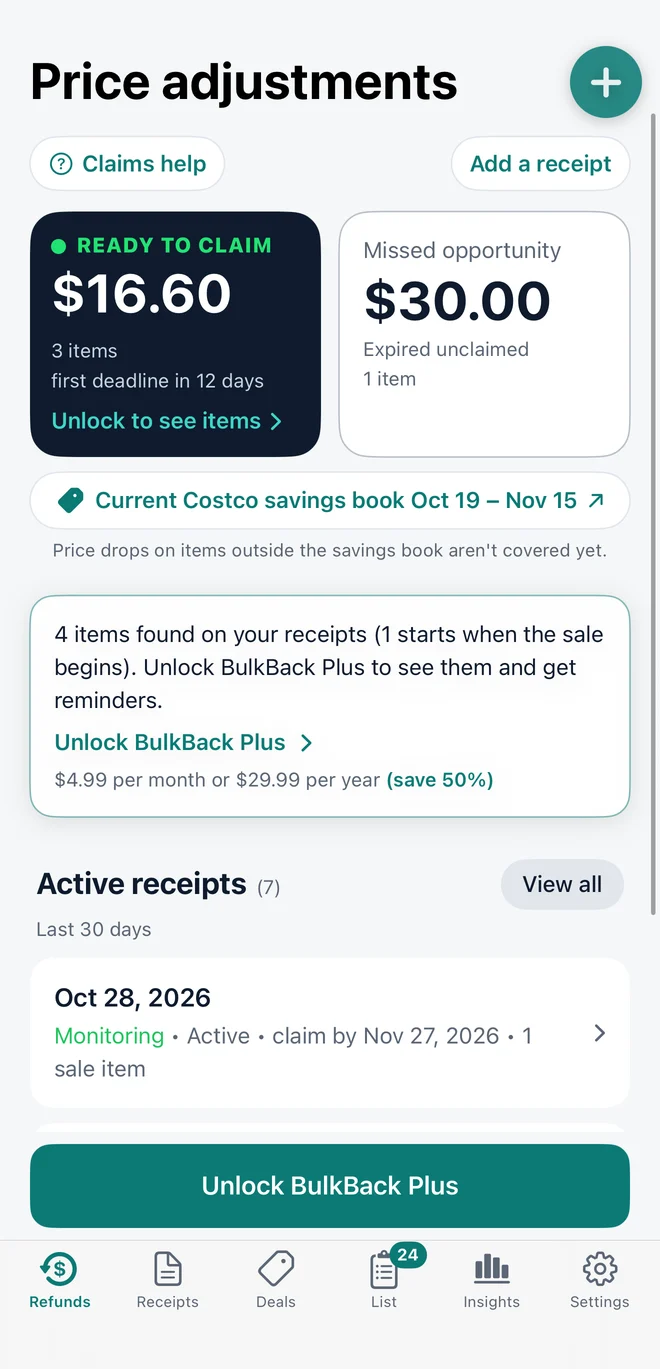
See what's waiting before you pay a cent.
On the free plan BulkBack still shows how much is ready to claim and how much expired unclaimed. Unlock BulkBack Plus to see which items and get reminders before the window closes.
- Free plan: see how much refund is waiting and how much you missed, plus most core features
- Plus plan: item names and numbers, the claim list, deadline reminders, and a few more features
- Cancel any time in your Apple settings
See the Pricing section below for more details.
Everything else your Costco trips need.
The free tools make every trip easier, even when nothing is on sale.
Receipts, searchable
Scan, store and search every receipt. With Plus, just ask: “How much did I spend on chicken this year?” or “When did I last buy eggs?”
Online orders too
Add Costco.com orders alongside warehouse receipts and claim them online.
Item history
Look up any item you've bought and see what you paid each time.
Light and dark
Follows your iPhone's appearance, so it's comfortable in a bright warehouse or a dark car.
Your receipts stay on your phone.
No account, no password, no sign-up. BulkBack does the matching on your device, so your receipts and photos never reach us. Optional features share only the limited details you choose.
Simple pricing.
Start free. Upgrade when you want the item-level alerts.
Example: $5.00 off laundry detergent + $4.60 off chicken strips + $7.00 off flashlights = $16.60 back. That covers more than half a year of Plus on the annual plan. Costco decides every claim, so a refund is never guaranteed.
Free
Forever
- Receipt scanning and history
- Searchable savings book
- Shopping list
- Purchase insights
- See the total waiting to claim
BulkBack Plus
or $29.99 / year (about $2.50 / month, save about 50%)
- Includes everything in Free
- See every claimable item and number
- Return desk claim list
- Ask your receipts in plain English
- Meal ideas, with an option to favor items on sale
- Automatic price-adjustment matching
- Alerts when your list items go on sale
- Reminders before deadlines
Billed through Apple and cancelable any time. See the Terms of Use.
Questions, answered.
What is a Costco price adjustment?
If an item you bought goes on sale at the same warehouse within 30 days of purchase, Costco may refund the difference. BulkBack helps you notice these chances. Costco decides each claim at the warehouse, so a refund is never guaranteed.
How does BulkBack find potential price adjustments?
You add your receipts. BulkBack compares the items on them with Costco's savings books and with price drops other members choose to share, then shows the potential refund and how many days are left to claim.
How do I claim?
BulkBack organizes your eligible items into two simple lists: Warehouse claims and Online claims. For in-warehouse purchases, open your Claim List at the membership/return desk—BulkBack displays large, easy-to-read item numbers and purchase dates, all on one screen that stays on until the job is done, so the clerk can process your refund in seconds. For Costco.com orders, just tap “Open Costco’s online form to claim” inside the app to jump straight to Costco’s price adjustment request page.
Do I need an account?
No. There is no sign-up or password. Your receipts stay on your iPhone. If you choose email alerts, BulkBack only needs your email address, confirmed with a code.
What does it cost?
Receipt scanning, history, insights, the shopping list and the savings book are free. BulkBack Plus is $4.99 per month or $29.99 per year and unlocks item-level matching, the claim list and reminders.
Does it work for online orders?
Yes. Warehouse and Costco.com purchases both appear in your claims. Online claims are filed through Costco's online form, which BulkBack opens for you.
Why didn't I get an alert for something I bought?
The item may not be on sale yet, the sale may be at a different warehouse, the 30-day window may have passed, or the item may not be eligible. Sale data comes from Costco's savings books and from members who choose to share. Member-spotted price drops grow as more people share, so coverage is incomplete at first.
Where is my data stored?
Your receipts and photos stay on your iPhone, and in your own iCloud account if iCloud backup is on. We can't see them. Optional features share limited details only if you turn them on: community price sharing (item prices, not linked to you), email alerts (your email address and reminder details) and Ask your receipts (only your question and today's date). Read the Privacy Policy for details.
When can I get it?
BulkBack for iPhone is in final preparation for the App Store, and Android follows about a month later. , or write to [email protected] with questions.
Is BulkBack affiliated with Costco?
No. BulkBack is an independent app from SAMCOM LLC and is not affiliated with, endorsed by, or sponsored by Costco Wholesale Corporation.
If the receipts and shopping list are not stored on BulkBack’s servers, what happens to them if I lose my phone or delete and reinstall the app?
You have two built-in ways to keep your data safe without BulkBack ever receiving your receipts:
- Automatic iCloud Backup: When turned on, BulkBack automatically backs up your receipts and shopping lists to your personal Apple iCloud account, so your history seamlessly restores if you get a new iPhone or reinstall the app.
- Manual Export & Import: Inside the app’s Settings, you can use the Export and Import functions at any time to save a complete backup file of your receipts and lists—giving you full control to keep a local copy or move your data between devices whenever you want.
Get the refund you deserve.
Every Costco trip is a chance for a refund you didn't know about.